
One backend. One database. An admin panel, a web app, and two mobile apps all talking to the same API.
For a while, everything worked.
Then traffic and workload increased. Response times crept up, background jobs piled up, and the database started showing strain.
The instinct at that point is almost always the same: add more servers.
But that's rarely the right first move. The core principle behind everything in this guide is simple:
Don't scale infrastructure before you understand the bottleneck.
This guide walks through how to actually scale a SaaS product — from measuring what's slow to optimizing your application, adding Redis and background jobs, and eventually scaling infrastructure horizontally.
What Actually Causes SaaS Scaling Problems?
Before reaching for new infrastructure, it helps to know where scaling pressure typically comes from. In practice, almost every scaling issue traces back to one of a handful of sources:
- Application/CPU — inefficient code, unnecessary computation, expensive serialization
- Memory — leaks, oversized in-memory state, large payloads held in process
- PostgreSQL — missing indexes, N+1 queries, connection exhaustion, long-running transactions
- Network — large responses, chatty APIs, too many round trips per request
- Background jobs — queues growing faster than workers can drain them
- File storage — large uploads living on the application server instead of dedicated storage
- Traffic/concurrency — more simultaneous users or requests than the system was designed to handle
These don't grow at the same rate, and they don't always scale with your user count. A SaaS with 10,000 lightweight users — occasional logins, small queries, minimal file activity — can be far cheaper to run than one with 1,000 users who generate reports, upload large files, and refresh real-time dashboards constantly. What matters isn't the raw number of users; it's what each of them is actually asking the system to do. This is why "we have X users, do we need to scale?" is the wrong question. The right question is "what is our workload actually doing to CPU, memory, the database, and the network?"
Step 1: Measure Before Scaling
The most common mistake developers and founders make is scaling based on a feeling — "the app feels slow" — rather than data. You bump up the server size, and maybe it helps, maybe it doesn't. Without visibility into why the system is slow, you're guessing, and guesses at the infrastructure level are expensive.
At minimum, track:
- CPU and RAM usage on your application servers
- API latency, especially p95 and p99, not just the average. A 200ms average can hide a p99 of 4 seconds that's quietly frustrating your heaviest users
- Database performance — query latency, active connections, slow queries, lock contention
- Error rate across endpoints, and which endpoints are generating errors under load
- Queue depth and job processing time, so growing backlogs are visible before they become outages
You don't need a fully mature observability stack on day one. A basic dashboard covering these five areas is usually enough to tell you where the system is struggling — application, database, or queue — before you spend money or engineering time fixing the wrong layer.
Step 2: Make Your Application Do Less Work
Before adding any infrastructure, ask: can the application simply do less work? This is almost always the cheapest scaling win, and it's the one most often skipped in favor of throwing hardware at the problem.
Use pagination. If an endpoint like GET /api/users can technically return 500,000 rows, don't let it. If the admin panel only shows 25 records at a time, the API shouldn't fetch all 500,000 on every request:
GET /api/users?page=1&limit=25
For very large tables, prefer cursor-based pagination over large offsets — an indexed cursor like WHERE id > 100000 ORDER BY id LIMIT 50 avoids the cost of skipping hundreds of thousands of rows just to discard them.
Avoid N+1 queries. Fetching 100 orders and then querying the customer for each one separately turns 1 query into 101. A single join or a batched fetch fixes this:
SELECT orders.id, orders.total, users.name
FROM orders
JOIN users ON users.id = orders.user_id;
The dangerous part of N+1 queries is that they're invisible at small scale. An endpoint that works fine with 10 records can become painfully slow the moment a customer has 10,000.
Find and fix slow endpoints. Not every endpoint matters equally — a health check might take 5ms while a reporting endpoint takes 5 seconds. Track request count, average latency, and p95/p99 per endpoint so you know exactly which ones are worth optimizing first, and break down where the time actually goes (database, external API calls, serialization) before assuming you know the cause.
Reduce payload size and unnecessary work. Don't fetch or serialize data the client doesn't need. Smaller responses mean less database work, less memory pressure, less serialization time, and less network traffic — all without adding a single server.
Step 3: Optimize PostgreSQL
For most Node.js SaaS products, PostgreSQL is where a large share of the real work happens — and it's often the first true bottleneck.
Add proper indexes. A query like SELECT * FROM orders WHERE user_id = 123 without an index on user_id forces PostgreSQL to scan far more of the table than necessary. An index can make this dramatically faster. But don't blindly index every column — indexes add storage overhead and slow down writes, so index the columns your important queries actually filter, join, or sort on.
Use EXPLAIN ANALYZE. When a query is slow, don't guess why:
EXPLAIN ANALYZE
SELECT * FROM orders WHERE user_id = 123;
This shows you exactly how PostgreSQL executes the query — sequential scans on large tables, expensive joins, poor row estimates, or unnecessary sorting all show up here. Database optimization should be based on evidence, not intuition.
Use connection pooling. Five application servers each opening 20 database connections adds up to 100 connections fast — and PostgreSQL has a finite limit. Pooling (and tools like PgBouncer for larger systems) lets you reuse connections efficiently instead of multiplying pressure every time you scale horizontally.
Keep transactions short. A transaction that begins, calls an external API mid-flight, waits several seconds, and only then commits can hold locks and connections far longer than necessary — increasing contention for every other request touching the same rows. Design the workflow so the transaction covers only the work that actually needs the guarantee, and do slow, non-transactional work (API calls, generating a report) outside of it.
If read traffic significantly outpaces writes and query optimization plus caching aren't enough, read replicas are worth considering — they let you offload reporting and dashboard queries to a separate database instance. For very large tables, partitioning is another advanced option worth knowing about. Neither is a first move, though; they matter once you've genuinely exhausted indexing, query optimization, and connection management.
Step 4: Add Redis Caching
Once your queries are efficient, caching is often the next lever — especially for data that's expensive to compute but doesn't need to be recalculated on every request.
Request
   ↓
Redis
   ↓
Cache hit?
  ↙     ↘
Yes      No
 ↓        ↓
Response  PostgreSQL
             ↓
           Redis
             ↓
          Response
What to cache: dashboard summaries, permissions, configuration, expensive calculations, and frequently accessed records.
Set a sensible TTL. A dashboard might cache for 60 seconds; configuration might last 10 minutes. The right TTL depends on how fresh the data needs to be.
Use cache-aside as your default pattern: the application checks Redis first, falls back to PostgreSQL on a miss, stores the result in Redis, and returns it. When the underlying data changes, invalidate or update the cached value — otherwise you risk returning a stale user balance or an outdated permission set long after the source of truth has changed.
Caching sounds simple in theory — "just put everything in Redis" — but invalidation is genuinely the hard part, and it's where most caching bugs come from. Use it deliberately for data where staleness is acceptable, not as a reflex every time the application feels slow.
One important caveat: Redis isn't your primary database. Beyond caching, it's also useful for rate limiting, distributed locks, sessions, and temporary state, but PostgreSQL should remain the source of truth for durable, business-critical data.
Step 5: Move Heavy Work to Background Jobs
Your API shouldn't make a user wait 30 seconds for a report to generate. That work belongs in the background:
User → API → Create Job → Queue → Worker → Store Result
The API responds immediately ({"status": "processing"}), and a worker handles the expensive part separately.
Common candidates for background processing: emails, PDF and report generation, image and video processing, data imports/exports, and webhook delivery. The common thread is that none of it needs to happen while the user is staring at a loading spinner.
Putting work in a queue doesn't automatically make it reliable, though. Jobs fail, networks fail, third-party APIs time out, and workers crash mid-task. A solid job system needs:
- Retries for transient failures
- Exponential backoff so a failing service isn't hammered
- Idempotency, since a job may run more than once — if a worker crashes after sending an invoice email but before marking the job complete, the retry needs to handle that safely rather than sending it twice
Monitor queue depth, failed jobs, retry counts, and processing time — a queue should make your system more resilient, not become a place where failed work quietly disappears.
Step 6: Protect the System
Scaling isn't only about handling legitimate growth — it's also about surviving traffic you didn't expect. An endpoint that normally handles 100 requests per minute can suddenly see 20,000, whether from a traffic spike, a misbehaving integration, or outright abuse.
Rate limiting — by user, API key, IP, endpoint, or subscription tier — keeps that kind of spike from taking down the whole system. A common pattern is tiering limits by plan (100 requests/minute on a free plan, 1,000 on a paid plan, custom limits for enterprise), and Redis is commonly used to enforce these limits consistently once you're running more than one application instance.
Step 7: Scale Infrastructure
Once the application and database are genuinely optimized, it's time to think about infrastructure.
Vertical scaling — give one machine more resources:
2 CPU / 4 GB
     ↓
8 CPU / 32 GB
It's simple and requires no architecture changes, but it has a ceiling, and a single larger machine is still a single point of failure.
Horizontal scaling — add more machines behind a load balancer:
             ┌── Node 1
Users → LB ──┼── Node 2
             └── Node 3
This is where your application needs to be stateless. If session data or important state only lives in one server's memory — an in-process object like const sessions = {} — a request routed to a different node won't see it, and the user gets inconsistent behavior depending on which server they hit. Shared state — sessions, cache, uploaded files — needs to live in PostgreSQL, Redis, or object storage, not in process memory. A load balancer also gives you health checks and failover for free: if one node crashes, traffic simply stops routing to it.
Horizontal scaling generally provides more capacity and better availability than vertical scaling, but it comes with real architectural requirements: shared sessions, shared cache, shared storage, careful database connection management, and better observability. That's why it should be adopted intentionally, once vertical scaling and application-level optimization have run their course — not as the default first move.
Don't Forget Storage and CDN
User → Object Storage
            ↓
          CDN
User-uploaded files shouldn't live on your Node.js server — disks fill up, and once you're running multiple instances, local files become inconsistent across nodes. Use object storage for uploads and a CDN for static, cacheable content close to your users. Both take load off your application servers for free.
When Should You Use Microservices or Kubernetes?
Probably not yet.
Almost every SaaS founder eventually asks this question, usually after reading about how a much larger company structures its infrastructure. The honest answer for most early and growing products is: you don't need them yet.
Start with a modular monolith — clean boundaries between modules inside a single deployable application. It's far easier to build, deploy, debug, and reason about than a distributed system, and it doesn't require solving problems like distributed tracing, service-to-service auth, or network reliability that microservices introduce by default. Move toward microservices only when there's a concrete reason: a specific workload that genuinely needs to scale independently of the rest of the system, or a team boundary large enough that separate deployment lifecycles actually help.
Kubernetes is an orchestration tool, not a scaling strategy by itself. It's genuinely useful once you have enough services and enough operational maturity to need it — but running it before that point adds real complexity (manifests, networking, cluster management) without necessarily solving a performance problem. Kubernetes doesn't make a slow query fast or an unindexed table efficient.
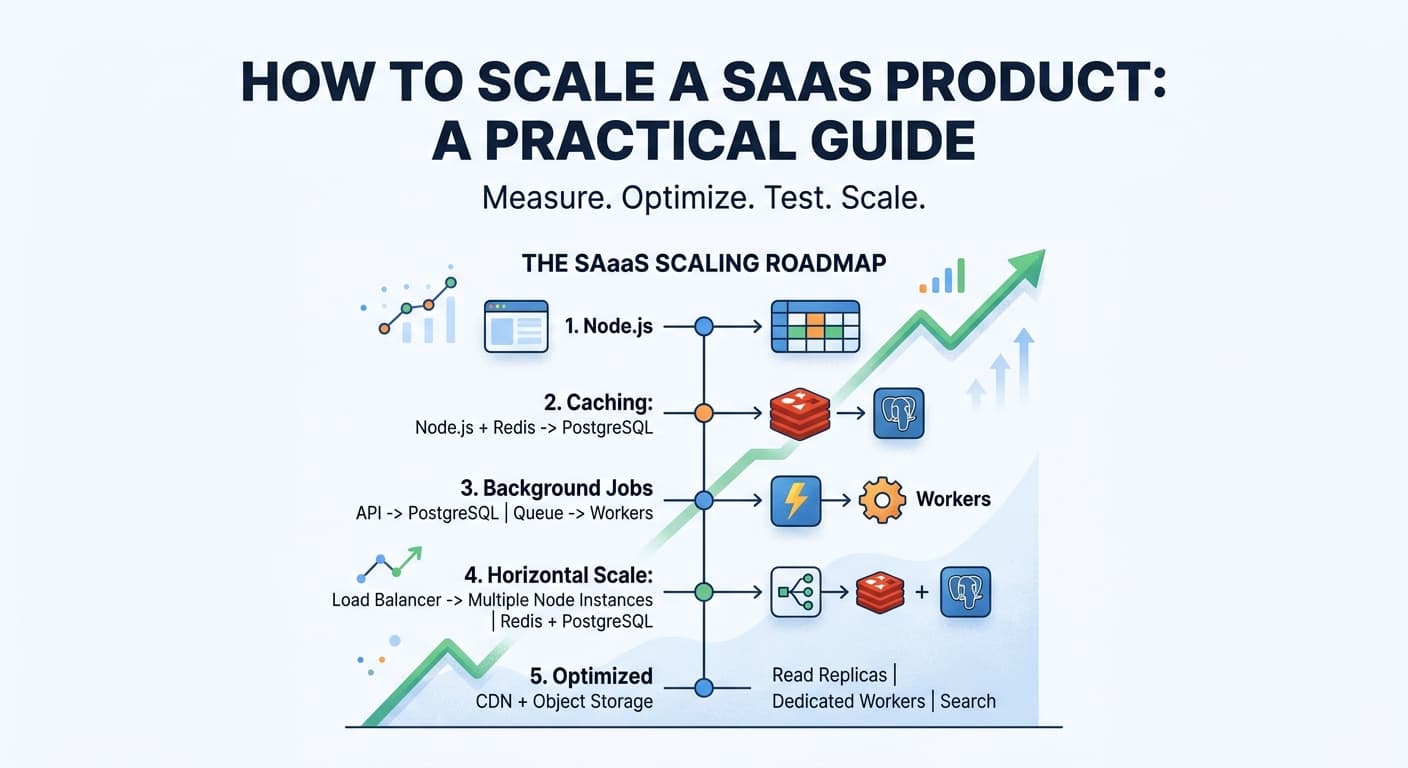
The SaaS Scaling Roadmap
Stage 1
Node.js → PostgreSQL

Stage 2
Node.js → PostgreSQL
              ↘ Redis

Stage 3
API → PostgreSQL
   ↓
Queue → Workers

Stage 4
             ┌── Node 1
Users → LB ──┼── Node 2
             └── Node 3
                  ↓
          Redis + PostgreSQL

Stage 5
CDN
Object Storage
Read Replicas
Dedicated Workers
Search
Advanced infrastructure
This progression matters more than any single diagram of a "final" architecture. Most SaaS products don't need Stage 5 on day one — and some never need it at all. The right stage is the one that matches your actual workload, not the one that looks most impressive on a whiteboard.
Scaling Checklist
Run through this before adding more infrastructure:
- •[ ] Identify your slowest API endpoints and their p95/p99 latency
- •[ ] Check CPU, memory, and database performance under current load
- •[ ] Make sure APIs use pagination and return only the data that's needed
- •[ ] Find and eliminate N+1 queries
- •[ ] Add indexes based on real query patterns, and verify with
- •EXPLAIN ANALYZE
- •[ ] Use connection pooling before scaling out application servers
- •[ ] Move expensive or slow work into background jobs
- •[ ] Add retries, backoff, and idempotency to your job system
- •[ ] Cache deliberately, with a clear TTL and invalidation strategy
- •[ ] Add rate limiting to public and sensitive endpoints
- •[ ] Move large file uploads to object storage, and put a CDN in front of static content
- •[ ] Make the application stateless before running multiple instances
- •[ ] Only introduce read replicas, microservices, or Kubernetes when there's a clear, measured reason
Final Takeaway
Don't scale your architecture before you understand your bottleneck.
The process that works, over and over again, is:
Measure → Optimize → Test → Scale
Start simple. Add complexity only when it solves a real, measured problem — not because it's what a bigger company happens to be running. A SaaS with 1,000 users might need nothing more than a well-optimized application and database. Another SaaS with the same number of users might genuinely need queues, Redis, and dedicated workers, depending entirely on what that workload looks like.
The most valuable scaling skill isn't knowing how to configure Kubernetes or stand up a new microservice. It's knowing where the bottleneck actually is — and having the discipline to fix that before reaching for anything else.
Key Takeaway
How We Approach Scaling at Seebify
At Seebify, we believe SaaS products should be built with scalability in mind — but not buried under unnecessary complexity.
The goal isn't to predict exactly how your product will look five years from now. It's to build a strong foundation that can evolve as the product grows.
That means: Measure → Optimize → Test → Scale.
If your SaaS is starting to outgrow its current architecture, don't immediately reach for more servers, microservices, or Kubernetes. First understand the bottleneck. Then solve the actual problem.
Building a SaaS that's starting to outgrow its current setup?
Talk to Seebify about designing a scalable architecture that grows with your product.